Report
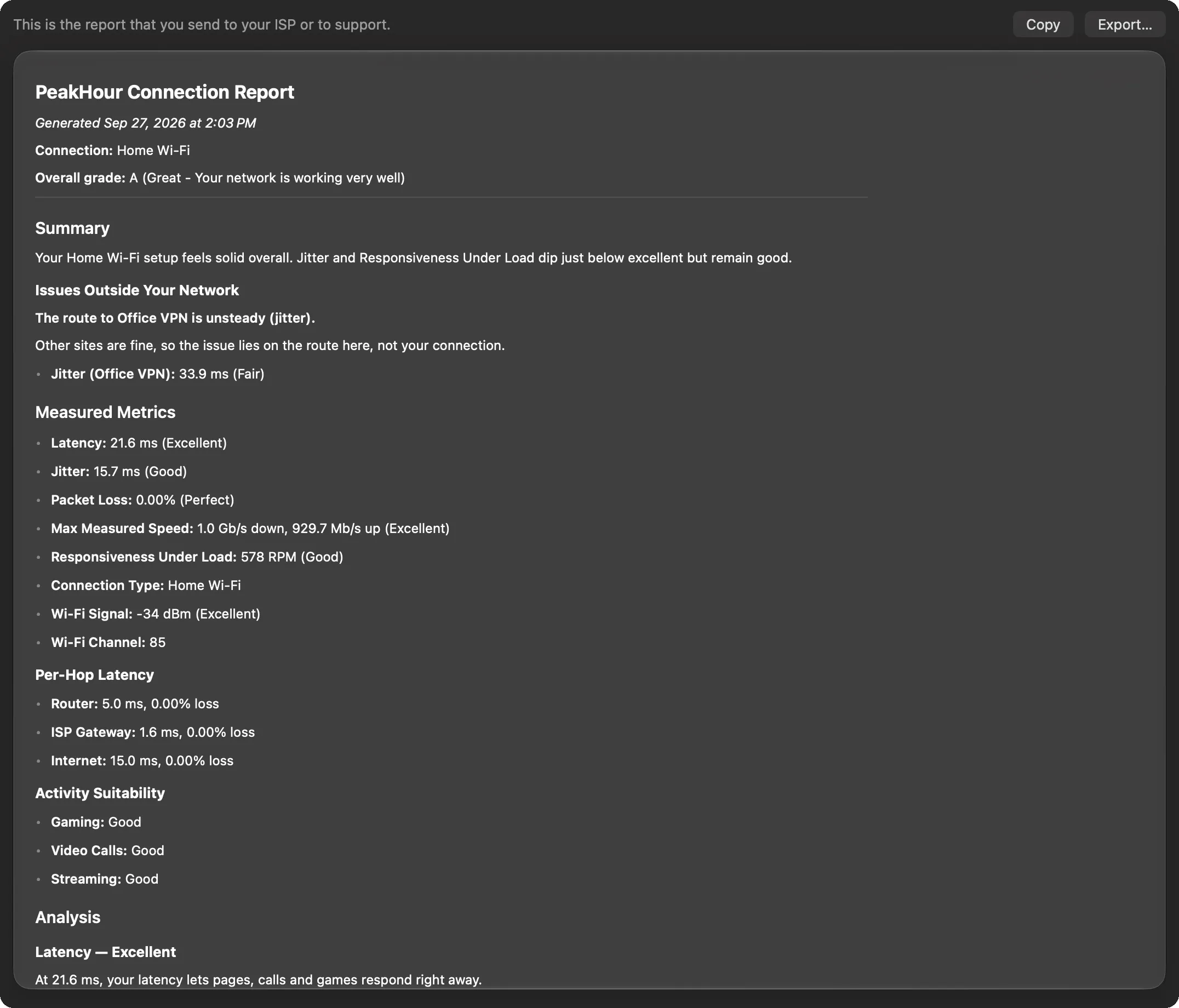
The Report page shows a formatted PeakHour Connection Report — the report to send to your ISP or to support when you need help with your connection.
It holds the same facts as the other pages, in one document:
- the date, your connection, and your overall grade;
- Summary — the summary sentence, the issues that hold the grade back, and any issues outside your network;
- Measured Metrics — latency, jitter, packet loss, the last speed test and responsiveness, each with its band, and your Wi-Fi signal and channel;
- Per-Hop Latency — the latency and loss to your router, your ISP’s gateway and the internet;
- Activity Suitability — video calls, gaming and streaming;
- Analysis — what each measurement means, the diagnostic findings, suggestions, and what already works well.
The report reflects the latest analysis, and updates with it.
Copy or export
Section titled “Copy or export”- Copy puts the report on the clipboard as Markdown text, ready to paste into an email or a support form.
- Export… saves it as a Markdown (
.md) file. You can also choose Export → Connection Report… in the window’s toolbar from any page.
Markdown is plain text with light formatting, so it reads well in any email or text editor, and support tools that understand Markdown show its headings and lists.
Was this page helpful?
Found something wrong, unclear, or out of date? Let us know and we'll fix it.